Phantom Backups: What Hosting Providers Don't Tell You About Data Recovery Until It's Too Late
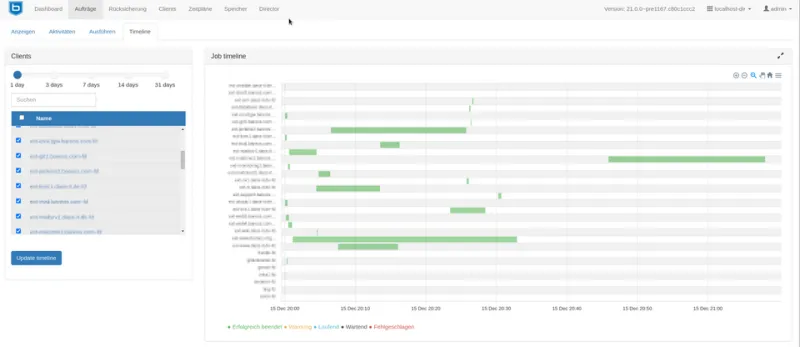
Photo: Bareos GmbH & Co. KG, CC BY-SA 4.0, via Wikimedia Commons
There is a particular kind of panic that arrives not when something breaks, but when you reach for the safety net and find it was never properly installed. For thousands of website owners across the United States every year, that moment arrives when a corrupted database, a botched plugin update, or a malware injection forces them to request a restore — only to learn that their hosting provider's celebrated automatic backup system has quietly failed them.
The gap between how backup features are marketed and how they actually perform under pressure is one of the most consequential and least discussed problems in the web hosting industry.
The Marketing Language Hosting Providers Use
Open almost any shared or managed hosting provider's pricing page and you will encounter reassuring language: "Daily automatic backups," "One-click restore," "30-day backup history." These phrases are engineered to project confidence. They imply completeness, accessibility, and reliability without committing to any of those qualities in enforceable terms.
The distinction matters enormously. A hosting provider that performs daily backups is not necessarily performing complete backups. Many providers snapshot only the files in your public directory, omitting database tables, email accounts, server configuration files, and custom cron jobs. Others exclude accounts that exceed a certain storage threshold — a detail buried in the terms of service that customers rarely read until the moment they need help.
Some providers go further, treating backup access as a premium feature. The backup infrastructure exists; retrieving anything from it costs extra.
Three Failure Modes That Appear After Disasters
Understanding how backup systems fail in practice requires looking at the categories of failure, not just isolated incidents.
Retention window mismatches. A provider advertising 30-day backup history may store only seven days of accessible snapshots, with older backups technically retained but not restorable without a manual request to the support team — a process that can take 48 to 72 hours. If your site was compromised gradually, as many malware infections are, the corruption may predate the accessible window entirely.
Backup corruption and silent failures. Backup jobs are automated processes, and automated processes fail without fanfare. A disk write error, a timeout during a large database export, or a misconfigured backup agent can produce a backup file that appears to exist but cannot be opened. Hosting providers rarely audit backup integrity proactively. You may not discover the file is corrupted until you attempt to restore it.
Scope exclusions. Staging environments, addon domains, subdomains hosted under a primary account, and email data are frequently excluded from standard backup routines. A site owner who loses their primary domain's files and expects a full restore may find their secondary properties were never included in the backup scope.
Why Providers Structure Backups This Way
The economics of shared hosting create direct pressure against comprehensive backup systems. Storage is the primary cost variable in backup infrastructure, and the more complete and frequent the backups, the more storage each customer account demands. Providers operating on thin margins — which describes most budget and mid-tier shared hosting companies — have a financial incentive to limit backup scope, frequency, and retention.
This is not always cynical. Some providers genuinely invest in backup infrastructure but fail to communicate its limitations clearly. Others, however, use backup marketing as a competitive differentiator while engineering the feature to minimize operational cost. The customer bears the consequences of that calculation.
Auditing Your Current Provider's Backup System
Before disaster creates the urgency, a deliberate audit of your hosting provider's backup capabilities can reveal the true state of your data protection. The following framework applies regardless of which provider you currently use.
Request a test restore. Contact your hosting provider's support team and ask them to restore a specific file or database table from a backup taken three to five days ago. Document the response time, the completeness of the restored data, and whether the process required any payment. A provider that cannot perform this task cleanly is a provider whose backup system should not be trusted in an emergency.
Read the terms of service backup clauses. Search your provider's terms for the words "backup," "data loss," and "liability." Most providers explicitly disclaim responsibility for data loss even when backup features are included in your plan. Understanding this limitation is not cause for immediate alarm, but it should calibrate your expectations appropriately.
Map what is actually being backed up. Ask your provider directly, in writing via support ticket, which components of your account are included in automated backups. Request confirmation about databases, email, subdomains, and configuration files. Save the response.
Verify backup frequency against your update cadence. If your site publishes content daily or processes transactions continuously, a once-daily backup snapshot means you could lose up to 23 hours of data in a worst-case scenario. Understand that ceiling before you need to live inside it.
Building a Redundant Backup Layer You Control
The most reliable backup system is one that does not depend on your hosting provider's infrastructure or goodwill. Several approaches allow site owners to establish independent backup coverage without migrating to a new host.
For WordPress sites, plugins such as UpdraftPlus and BlogVault can be configured to push encrypted backup archives to external destinations including Amazon S3, Google Drive, or Backblaze B2 on a schedule you define. These backups exist entirely outside your hosting environment, meaning a server-level failure at your provider cannot affect them.
For non-WordPress environments, command-line tools like rsync and mysqldump can be scripted to run on a schedule and push output to remote storage. Many developers also use services like CodeGuard or Acronis Cyber Protect, which specialize in website backup and provide genuine point-in-time restoration with auditable logs.
The cost of external backup storage — often $2 to $10 per month depending on site size — is trivially small compared to the cost of reconstructing a lost website from scratch.
The Standard Your Backup System Should Meet
A backup system worth trusting must satisfy three conditions: it must be complete, meaning all critical data components are captured; it must be verified, meaning backup integrity is tested periodically rather than assumed; and it must be accessible, meaning restoration does not require negotiating with a support queue during a crisis.
If your current hosting provider's backup offering cannot meet all three conditions, that is not a minor inconvenience. It is a structural risk to your online infrastructure — one that many site owners only discover at the worst possible moment.
The flame that keeps your site running should never depend on a safety mechanism you have never tested.